Instagram remains one of the most popular social media platforms in the United States and worldwide. In fact, more than 2 billion people actively use Instagram every month. Many users share personal photos, stories, and videos daily. However, public profiles can expose private content to strangers and unwanted followers. That is why many people search for ways to protect their accounts and personal information. If you want more control over your audience, learning how to make my Instagram private is one of the smartest privacy steps you can take today.
Why You Should Make Your Instagram Account Private
A private Instagram account gives you more control over who sees your posts and stories. Only approved followers can view your content after you switch to private mode. This setting also blocks random users from viewing your photos and reels. As a result, your online privacy improves significantly.
Many users in the USA prefer private accounts to protect family photos and personal moments. Parents especially use this feature to keep children’s images secure online. Moreover, influencers sometimes use private accounts for exclusive communities. Therefore, a private profile works well for both personal and professional reasons.
What Happens When You Make Instagram Private
Changing your account to private affects several parts of your Instagram experience. New users must send follow requests before viewing your content. Additionally, your stories, reels, and posts become visible only to approved followers. Existing followers still keep access unless you remove them manually.
Private accounts also limit how your content appears in search engines and hashtag pages. Although your username remains searchable, your posts stay hidden from non-followers. Consequently, this setting reduces unwanted attention and improves account security.
How To Make My Instagram Private On Mobile
Most Instagram users access the platform through mobile devices. Thankfully, Instagram makes the privacy process very simple. You can complete the change within a few minutes using the app.
Steps For iPhone And Android Users
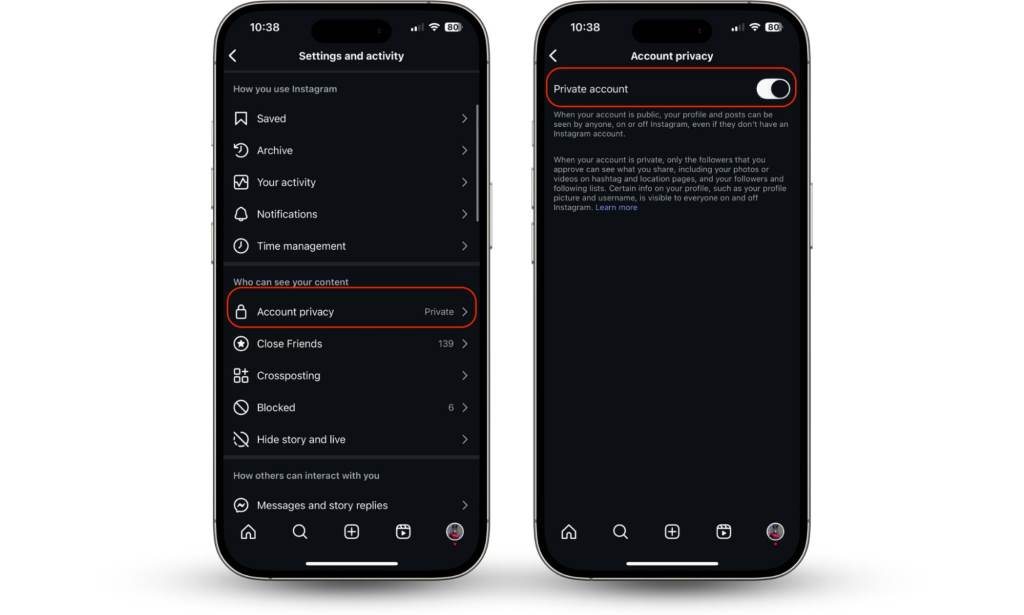
Follow these steps carefully to make your Instagram account private:
- Open the Instagram app
- Tap your profile picture in the bottom right corner
- Press the three-line menu icon
- Select “Settings and Privacy”
- Tap “Account Privacy”
- Turn on the “Private Account” option
- Confirm your choice when Instagram asks
Once enabled, only approved followers can view your content. Additionally, Instagram automatically saves this setting for future use.
How To Make My Instagram Private On Desktop
Some users prefer managing social media accounts from a laptop or desktop computer. Fortunately, Instagram allows privacy changes through web browsers as well. The process looks slightly different but remains easy.
Desktop Privacy Setup Guide
Use these simple instructions on your computer:
- Visit Instagram.com and log into your account
- Click “More” on the left sidebar
- Open “Settings”
- Select “Privacy and Security”
- Find “Account Privacy”
- Check the box beside “Private Account”
Your account becomes private immediately after saving the changes. Therefore, desktop users receive the same privacy protection as mobile users.
Benefits Of Keeping Your Instagram Private
Private Instagram accounts offer several strong advantages for everyday users. Many people feel safer when strangers cannot access personal content freely. Furthermore, private profiles help reduce spam comments and fake followers.
Here are some major benefits of a private account:
- Better control over followers
- Increased protection from scammers
- More secure personal photos
- Reduced unwanted messages
- Improved family privacy
- Stronger online boundaries
These advantages matter even more in large cities across the USA, where social media exposure often attracts spam accounts and online harassment.
Can People Still Find You On Instagram?
Many users worry that switching to private mode completely hides their profile. However, Instagram still allows people to search for your username and profile picture. Your bio and follower count also remain visible publicly.
Still, non-followers cannot see your posts, reels, or stories. Additionally, they cannot zoom into private content without approval. Therefore, your account stays discoverable while keeping your content protected.
How To Approve Or Remove Followers
Making your account private gives you full control over your audience. Every new follower request appears in your notifications. You can either approve or decline requests based on your preference.
To remove existing followers:
- Open your followers list
- Tap “Remove” beside a follower’s name
- Confirm the removal
Instagram does not notify users when you remove them. Consequently, you can quietly clean your follower list for better privacy.
Best Privacy Settings To Use Alongside A Private Account
A private account improves safety, but additional privacy settings create stronger protection. Instagram offers several built-in tools that help users manage online interactions. Combining these settings creates a more secure experience.
Hide Your Story From Specific People
Instagram lets you block certain followers from viewing your stories. This option helps when you want selective privacy without removing someone entirely.
To hide stories:
- Go to “Settings and Privacy”
- Select “Story”
- Tap “Hide Story From”
- Choose the users you want to block
This feature works especially well for professionals who mix personal and business followers.
Restrict Unwanted Users
The restrict feature limits interactions without fully blocking someone. Restricted users can still follow you, but their comments become hidden from others.
This setting helps reduce online drama and harassment quietly. Additionally, it allows you to avoid confrontation while maintaining account control.
Turn Off Activity Status
Instagram shows followers when you are active online. However, you can disable this feature for more privacy.
To turn it off:
- Open “Settings and Privacy”
- Select “Messages and Story Replies”
- Tap “Show Activity Status”
- Disable the option
As a result, others cannot see when you were last active.
Common Mistakes People Make With Private Accounts
Some users think a private account guarantees complete online security. Unfortunately, screenshots and screen recordings still allow followers to save your content. Therefore, you should remain careful about what you post.
Another common mistake involves accepting unknown followers too quickly. Fake accounts often appear trustworthy at first glance. Consequently, reviewing profiles carefully before approval remains important.
People also forget to update privacy settings after app updates. Instagram occasionally changes menu layouts and security features. Therefore, checking your settings regularly helps maintain protection.
How Private Accounts Affect Instagram Growth
Private accounts usually grow more slowly than public profiles. Potential followers cannot preview your content before sending requests. Therefore, some users may hesitate to follow private accounts.
However, privacy-focused users often prefer quality followers over large numbers. Many creators build close communities through private accounts successfully. Additionally, engagement rates sometimes improve because followers feel more connected.
If you run a business account, staying public often works better for marketing. On the other hand, personal users usually benefit more from private settings.
Can Business Accounts Be Private?
Instagram does not allow business accounts to remain private. If you want privacy, you must switch back to a personal account first. Creator accounts also require public visibility for professional tools.
To switch account types:
- Open “Settings and Privacy”
- Select “Account Type and Tools”
- Tap “Switch Account Type”
- Choose “Personal Account”
After switching, you can activate private mode immediately.
How Teens And Parents Can Use Instagram Privacy Safely
Online privacy matters greatly for teenagers and families in the USA. Social media exposure can attract cyberbullying, scams, and unwanted communication. Therefore, parents should encourage strong privacy settings early.
Teens should avoid sharing school locations, phone numbers, or home addresses publicly. Additionally, parents can review follower lists regularly with younger users. Open communication about online safety also helps build healthier social media habits.
Instagram offers parental supervision tools for added protection. Consequently, families can monitor account activity responsibly without invading privacy completely.
How Often Should You Review Your Followers?
Privacy settings work best when combined with regular follower management. Many users accept requests quickly and forget about them later. However, inactive or suspicious followers can create risks over time.
Experts recommend reviewing followers every few months. Remove unfamiliar accounts and suspicious profiles regularly. Additionally, check for fake accounts using stolen profile photos or strange usernames.
This habit becomes especially useful during travel seasons in the USA, when social media scams and fake accounts often increase.
Signs You Should Immediately Make Your Instagram Private
Some situations strongly indicate the need for a private account. If strangers constantly message or follow you, switching to private mode helps quickly. Additionally, personal content should stay protected during stressful situations like breakups or harassment.
You should also consider privacy if:
- Your account receives spam comments
- Fake accounts copy your photos
- You share family content often
- You value personal boundaries online
- Your workplace monitors social media activity
A private profile creates an immediate layer of protection in these situations.
Tips To Stay Safe Even With A Private Account
Private accounts improve security, but safe online behavior still matters. Followers can still screenshot posts and share content externally. Therefore, thoughtful posting habits remain important.
Use these safety tips consistently:
- Avoid sharing exact locations in real time
- Create strong passwords
- Enable two-factor authentication
- Review tagged photos regularly
- Avoid suspicious direct messages
- Update Instagram frequently
These habits strengthen your overall social media security significantly.
Conclusion
Learning how to make my Instagram private helps you control your digital space more effectively. A private account protects personal photos, limits unwanted attention, and improves online safety. Moreover, Instagram offers several additional privacy tools that strengthen account security further. Whether you are a student, parent, creator, or casual user, protecting your social media presence matters more than ever today. Review your settings regularly, manage followers carefully, and use Instagram responsibly for a safer online experience.
FAQs
How do I know if my Instagram account is private?
Your account is private when a lock icon and follow approval system appear for new visitors.
Can I make my Instagram private without losing followers?
Yes, your existing followers stay connected unless you remove them manually.
Will people know when I make my Instagram private?
Instagram does not send notifications when you switch to private mode.
Can private Instagram posts appear on Google?
No, private posts do not appear publicly in Google search results.
Does a private Instagram account stop screenshots?
No, followers can still take screenshots of your content.
Related Reads
Read more: How To Record Without Holding The Button On Snapchat
Explore: How Does TikTok Increase Brand Awareness
Read more: Why Does Your Music Stop When You Open Facebook? Here’s What To Do